
Website visitor tracking is how small business owners find out who is coming to their site, where those people came from, and whether they did anything useful once they arrived. Done right, it turns a website from a digital brochure into a decision-making tool. The core metrics that matter most are traffic sources, engagement, and conversion rates, because those three connect directly to revenue rather than vanity numbers.
Table of Contents
- Why tracking website visitors matters for small businesses
- How website visitor tracking technology actually works
- What types of visitor tracking should you use?
- Which tools work best for tracking visitors on a small business site?
- How to use visitor data to improve marketing, sales, and user experience
- Privacy laws and compliance you need to know
- Frequently asked questions about tracking website visitors
- Expert advice and key stats for small business visitor tracking
- How to set up website visitor tracking step by step
- Common challenges in visitor tracking and how to get past them
- Ready to build a site worth tracking?
- Key Takeaways
Why tracking website visitors matters for small businesses
Most small business owners build a website and then guess whether it is working. Visitor tracking replaces the guesswork with actual evidence. You learn which pages hold attention, which ones send people away, and which marketing channels are worth your budget.
The practical benefits break down into three areas:
- Traffic sources: Knowing whether visitors arrive from Google, social media, email, or direct searches tells you where to invest your time and money. Traffic attribution across organic, paid, referral, direct, social, and email channels is a baseline capability of every serious analytics tool.
- Engagement signals: Bounce rate, time on page, and pages per session reveal whether your content is connecting or falling flat.
- Conversion tracking: Form submissions, phone calls, purchases, and bookings show whether visitors are becoming customers, not just browsers.
The website remains a primary lead source for small businesses. Many small businesses say their site is a major source of leads, and most businesses with a site consider it at least somewhat important to growth. Tracking visitor behavior is what turns that potential into a repeatable system.
Industry standards for web analytics are shaped by bodies like the W3C (which governs data collection protocols) and privacy regulators like the Federal Trade Commission in the United States. These set the boundaries for what you can collect and how you must disclose it.
How website visitor tracking technology actually works
Every analytics tool relies on a small piece of code, usually a JavaScript snippet, placed in your website's header. When a visitor loads a page, that script fires and sends data to the analytics platform. Cookies, pixels, and session identifiers help the tool recognize returning visitors and stitch together a complete picture of a single visit.
The data collected typically includes:
- Pages visited and in what order
- Time spent on each page
- Clicks on buttons, links, and forms
- Device type, browser, and geographic location
- Traffic source (how the visitor found the site)
- Conversion events (form fills, purchases, bookings)
Once collected, that data gets visualized in dashboards, heatmaps, and session replays. A dashboard gives you aggregate numbers at a glance. A heatmap shows where on a page users click or scroll. Session replays let you watch an anonymized recording of an individual visit, which is particularly useful for spotting where people get confused or drop off.
| Data type | What it tells you | Example tool |
|---|---|---|
| Traffic source | Where visitors came from | Google Analytics, Google Search Console |
| Engagement metrics | How visitors interact with content | Microsoft Clarity, Hotjar |
| Conversion events | Whether visitors took a desired action | Google Analytics, HubSpot |
| Search impressions | How often pages appear in search results | Google Search Console |
| Behavioral recordings | What visitors click, scroll, and ignore | Microsoft Clarity, Hotjar |

Cookieless tracking is a growing alternative, using fingerprinting or aggregated signals instead of browser cookies. This approach is gaining traction as browsers phase out third-party cookies and privacy expectations rise.
What types of visitor tracking should you use?
Not every tracking method serves the same purpose. Choosing the right mix depends on what questions you are trying to answer.
Visitor analytics covers the fundamentals: sessions, unique visitors, page views, and traffic sources. This is where most small businesses start, and for good reason. It answers the most basic question: is anyone showing up?
Behavioral tracking goes deeper. Heatmaps and session recordings show how users interact with specific pages beyond what standard metrics capture. If your contact page gets 600 visits but only 10 form submissions, a session recording will often show you exactly why.
Conversion tracking ties visitor actions to business outcomes. Setting up goals in your analytics tool, whether that is a form submission, a phone call, or a completed purchase, lets you measure what actually matters rather than raw traffic volume.
Search visibility monitoring is a category many small businesses overlook entirely. Google Search Console shows how often your pages appear in search results even when no one clicks through. As AI-driven answers increasingly appear at the top of search pages, impressions data has become a more accurate measure of reach than session counts alone.
Each type serves a different layer of the customer journey. Visitor analytics tells you about reach. Behavioral tracking tells you about experience. Conversion tracking tells you about outcomes. Search visibility tells you about discovery.
Which tools work best for tracking visitors on a small business site?
The right tool depends on your budget, technical comfort level, and what you need to measure. Here are the options worth knowing:
- Google Analytics (GA4): Free, widely used, and deeply capable. It tracks sessions, traffic sources, user behavior, and conversion events. The learning curve is real, but the free tier covers everything most small businesses need.
- Google Search Console: Also free, and focused specifically on search performance. It shows which queries bring people to your site, how often your pages appear in results, and where your rankings stand. Pair it with GA4 for a complete picture.
- Matomo: An open-source analytics platform that you can self-host for full data ownership. Matomo is a strong choice for businesses that want GDPR-compliant tracking without sending data to a third party. It offers heatmaps, session recordings, and goal tracking.
- Microsoft Clarity: Free behavioral analytics from Microsoft. Clarity specializes in heatmaps and session recordings, making it easy to see exactly how visitors navigate your pages. It integrates directly with GA4, so you get behavioral data alongside your standard metrics.
- Hotjar: Paid (with a limited free tier), Hotjar offers heatmaps, session recordings, and on-site surveys. It is particularly useful for identifying friction points in checkout flows or lead capture forms.
- HubSpot: Best for businesses that want to connect traffic to leads and sales in one system. HubSpot combines analytics with CRM and email marketing, so you can see the full path from first visit to closed deal.
Most small businesses benefit from running at least two tools simultaneously: GA4 for aggregate traffic data and either Microsoft Clarity or Hotjar for behavioral insights. Google Search Console belongs in every setup, regardless of what else you use.
Pro Tip: Microsoft Clarity is completely free with no visitor caps, and its session recording quality rivals paid tools. If budget is tight, start there alongside GA4 before spending anything.
How to use visitor data to improve marketing, sales, and user experience
Raw data does not improve your business. What you do with it does. The goal is to link visitor metrics to business goals like sales and leads, rather than tracking every available number and drowning in reports.

Start with traffic sources. If social media drives 64% of your traffic but those visitors convert at a fraction of the rate of organic search visitors, that tells you where to focus your content investment. A channel that brings volume without revenue is not an asset.
UTM parameters are one of the most practical tools for small businesses running any kind of paid or email campaign. Adding UTM tags to your links lets your analytics platform show exactly which campaign, ad, or email drove a specific visit or conversion. Without them, that traffic gets lumped into "direct" and you lose the attribution entirely.
Key strategies for turning visitor data into real improvements:
- Identify your top three converting pages and make sure they are easy to find from your homepage.
- Find pages with high traffic but low engagement (high bounce rate, short time on page) and revise the content or layout.
- Compare traffic sources by conversion rate, not just volume, to allocate your marketing budget where it actually produces customers.
- Use session recordings to watch real visitors navigate your site before making any redesign decisions. Gut instinct about UX is often wrong.
- Track form abandonment to find out where in a multi-step process visitors give up.
Pro Tip: Avoid checking your analytics every day. Daily fluctuations are normal and will cause you to overreact to noise. For most small businesses, a monthly review cadence is enough to catch real trends and make decisions that hold up.
Connecting your analytics to a CRM or email platform gives you a fuller picture of the customer journey. Someone might visit your pricing page three times over two weeks before filling out a contact form. Without that connection, you only see the last touchpoint.
Privacy laws and compliance you need to know
Tracking website visitors comes with legal obligations, and ignoring them creates real risk. The two regulations that affect most US small businesses are GDPR and CCPA.
GDPR and CCPA both require transparency about what data you collect, user consent where applicable, and data minimization, meaning you should only collect what you actually need. GDPR applies if any of your visitors are located in the European Union. CCPA applies if you serve California residents and meet certain thresholds.
Compliance steps every small business should take:
- Post a clear privacy policy that explains what tracking tools you use, what data they collect, and how long you retain it.
- Add a cookie consent banner if you use cookies for tracking, especially if you have any EU visitors. Tools like Cookiebot or OneTrust can automate this.
- Use data minimization: Only enable the tracking features you actually use. Collecting data you never analyze creates liability without benefit.
- Offer opt-out options for California residents under CCPA, including a "Do Not Sell My Personal Information" link if applicable.
- Review your third-party tools: Every analytics platform you add to your site collects data. Know what each one collects and whether its data practices align with your privacy policy.
Cookieless analytics tools like Matomo (self-hosted) or privacy-first platforms reduce compliance complexity because they do not rely on browser cookies or send data to third-party servers. For small businesses that want to track visitors without the consent banner overhead, this is worth considering.
Frequently asked questions about tracking website visitors
Can you legally track website visitors? Yes, with proper disclosure. You must inform visitors through a privacy policy and, in many cases, obtain consent before setting tracking cookies. GDPR and CCPA set the main standards for US businesses.
What is the best free tool to track website visitors for a small business? Google Analytics combined with Google Search Console covers most needs at no cost. Add Microsoft Clarity for behavioral data and you have a solid three-tool setup without spending anything.
How do you know where your website visitors are coming from? Your analytics platform breaks traffic into channels: organic search, direct, social, referral, email, and paid. Google Analytics and most other tools show this breakdown in a traffic sources report.
Do you need coding skills to set up visitor tracking? Not for most tools. Google Analytics, Microsoft Clarity, and Hotjar all provide a snippet of code you paste into your site's header, or a plugin if you use WordPress. No developer required for basic setup.
What metrics should a small business focus on? Start with traffic sources, top pages, bounce rate, and conversion rate. Those four give you a clear performance snapshot without overwhelming you with data you cannot act on.
How often should you review your analytics? Monthly reviews are best for most small businesses. Weekly reviews may be useful during intense campaigns, but daily checks are unnecessary and typically create anxiety rather than insight.
Expert advice and key stats for small business visitor tracking
The single most common mistake small business owners make with analytics is tracking too much. Digital business analysts consistently advise aligning your metrics directly with key objectives like lead generation and sales, rather than building elaborate dashboards that measure everything and inform nothing.
A few principles that separate effective tracking from busy tracking:
- Pick two or three KPIs that connect directly to revenue. For a service business, that might be contact form submissions and phone calls. For an e-commerce store, it is conversion rate and average order value.
- Build a simple monthly dashboard with four columns: traffic source, top pages, changes from last month, and one action metric. That is genuinely all most small businesses need.
- Treat analytics as a feedback loop, not a report card. The question is not "how did we do?" but "what should we change?"
- Website traffic alone is not the goal. The survey finding that 35% of small business owners cite converting traffic as their number one challenge is a useful reminder: a visitor who does not become a customer is just a page view.
Stat to know: 94% of small businesses with a website say it is at least somewhat important to their growth, yet converting that traffic remains the top challenge.
The businesses that get the most from their analytics are the ones that review data on a schedule, act on one or two findings per month, and measure whether those actions moved the needle. That cycle, repeated consistently, compounds over time in ways that daily dashboard-checking never does.
How to set up website visitor tracking step by step
Getting tracking in place takes less than an hour for most small business websites. Here is the practical sequence:
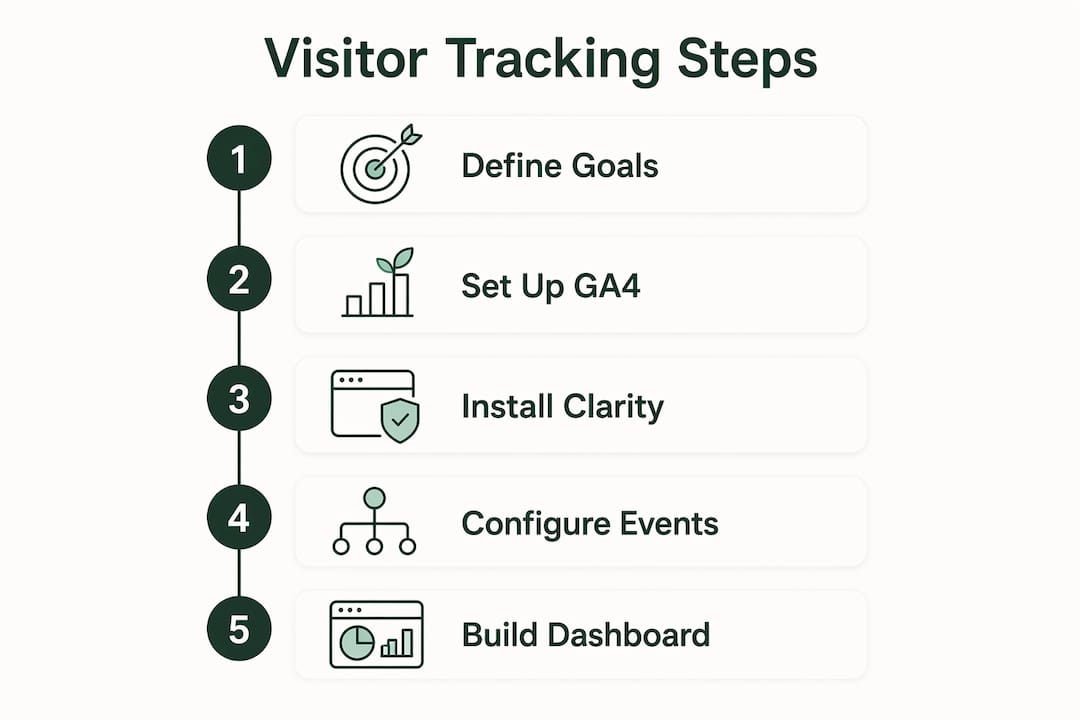
Step 1: Define what you want to measure. Before installing anything, write down your one primary goal. Is it contact form submissions? Phone calls? Online purchases? Your goal determines which conversion events you need to track.
Step 2: Create a Google Analytics 4 account. Go to analytics.google.com, create a property for your website, and copy the measurement ID. This is free and takes about five minutes.
Step 3: Install the tracking code. Paste the GA4 snippet into your site's <head> tag, or use a plugin like Site Kit by Google if you are on WordPress. If you use a website builder, check its integrations panel for a native GA4 connection.
Step 4: Add Google Search Console. Go to search.google.com/search-console, verify your site (the easiest method is through GA4 if already connected), and link the two accounts. You will start seeing search impression data within a few days.
Step 5: Install Microsoft Clarity. Create a free account at clarity.microsoft.com, add the script to your site the same way you added GA4, and connect it to your GA4 property. Session recordings and heatmaps begin populating within hours.
Step 6: Set up conversion tracking. In GA4, configure events for your key actions: form submissions, button clicks, or purchases. For phone call tracking, a tool like CallRail adds a dynamic number to your site that routes calls and logs them as conversions.
Step 7: Build your monthly dashboard. Use GA4's built-in reporting or a free tool like Google Looker Studio to create a single-page view showing your four core metrics. Bookmark it and review it on the same day each month.
The whole setup, done in this order, gives you traffic data, search visibility, behavioral recordings, and conversion tracking without paying for anything. A well-designed small business website makes this setup faster because the code structure is clean and the pages are organized logically.
Common challenges in visitor tracking and how to get past them
Data overload. The most common problem. GA4 alone surfaces hundreds of metrics, and most of them are irrelevant to a small business. Fix: create a custom report with only your five chosen metrics and ignore everything else until you have a reason to look deeper.
Inaccurate traffic attribution. When visitors arrive through multiple touchpoints before converting, last-click attribution gives all the credit to the final channel and none to the ones that built awareness. Fix: use UTM parameters on every campaign link and review the "path exploration" report in GA4 to see multi-touch sequences.
Spam and bot traffic inflating numbers. Some analytics accounts, especially newer ones, pick up bot traffic that makes session counts look higher than they are. Fix: enable Google's bot filtering in GA4 settings, and cross-reference session counts with conversion rates. If sessions spike but conversions stay flat, suspect bots.
Low conversion rates with no obvious cause. You have traffic but no leads. Fix: install Microsoft Clarity and watch session recordings on your highest-traffic pages. The answer is almost always visible in the first ten recordings, whether it is a broken form, a confusing layout, or a call-to-action that nobody sees.
Privacy compliance gaps. Many small businesses install analytics without a privacy policy or cookie consent mechanism. Fix: add a privacy policy page, implement a cookie consent banner, and audit your third-party scripts quarterly. Booking completion rates often improve when visitors trust that their data is handled responsibly.
Tracking breaking after a site update. A theme change or plugin update can remove your analytics code without warning. Fix: check your GA4 real-time report after every site update. If you see zero active users when you know people are on the site, the code is missing.
Ready to build a site worth tracking?

Tracking visitor data only pays off when your website is built to convert. Talivo builds professional, mobile-first websites in minutes using AI, whether you are starting from scratch, converting a Google Maps listing, or refreshing an outdated site. Once your site is live, every tracking tool covered in this article plugs straight in.
Build your website with Talivo and give your analytics something worth measuring.
Key Takeaways
Tracking website visitors is most effective when you focus on a small set of metrics tied directly to revenue, review data monthly rather than daily, and use free tools like GA4, Google Search Console, and Microsoft Clarity before spending anything.
| Point | Details |
|---|---|
| Focus on revenue metrics | Track traffic sources, engagement, and conversions rather than raw page views or session counts. |
| Monthly review cadence | Monthly analytics reviews are ideal for most small businesses, avoiding daily overreactions and surfacing real trends. |
| Free tools cover most needs | GA4, Google Search Console, and Microsoft Clarity together cost nothing and cover traffic, search visibility, and behavior. |
| Privacy compliance is required | GDPR and CCPA require a privacy policy, cookie consent, and data minimization for any site tracking visitors. |
| 94% of businesses say their site matters | Small businesses with websites overwhelmingly report them as important to growth, making tracking a direct business priority. |